
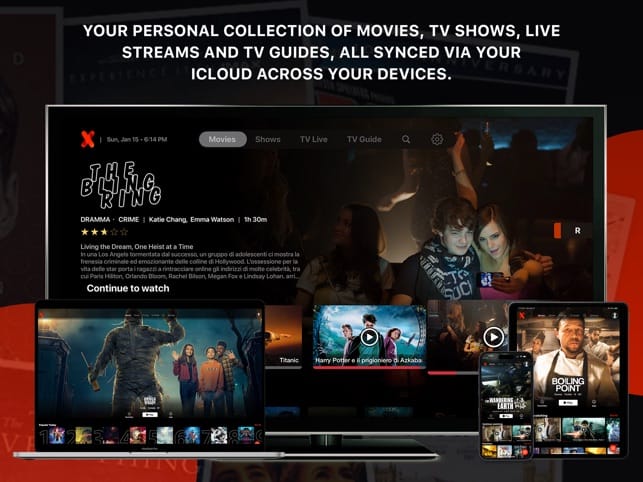
Using IPTVX to watch your content from uPlay is a simple and efficient process. With over 16,000 live channels and 60,000+ TV shows and movies available, you can easily access major streaming services like Netflix, Apple TV+, Hulu, and Disney+. Follow this guide to learn how to install IPTVX on your device and log in to your subscription service to start enjoying a wide variety of content, whether you choose a monthly plan for 79 SEK/month or annually for 599 SEK/year.
Key Takeaways:
- Installation and Access: To use the IPTVX app to watch our content from uPlay, you must first install IPTVX on your device. For Apple devices, the app is available in the App Store, while Android users must sideload the APK file using a sideloading tool such as Downloader for TV.
- Logging in with your subscription: After installation, open the IPTVX app, swipe left on the screen, and select “New Playlist.” Then select Xtream API and enter the login credentials you received from your uPlay subscription.
- Content to Watch: With a uPlay subscription, you get access to over 16,000+ live channels and 60,000+ TV shows and movies. We offer four types of subscriptions: two monthly subscriptions for 79 SEK or 99 SEK/month and two annual subscriptions for 599 SEK or 899 SEK/year.
How to Use the IPTVX App for Automatic Streaming with uPlay
uPlay offers a wide range of IPTV content that you can enjoy through the IPTVX app. Follow these steps to get started with our service: 1. Installing IPTVX: - For Apple users: Go to the App Store, search for the IPTVX app, and download it. - For Android users: Downloading and installing the IPTVX APK requires you to sideload the application. Use a tool like Downloader for TV. Please note that IPTVX is not officially available on Google Play. 2. Sign up and log in: - Once IPTVX is installed, open the app. - Swipe left and tap 'New Playlist'. - Select Xtream API as your login method. - Enter the login credentials you received via uPlay, and tap 'Log In'. 3. Start streaming: - Once you’ve logged in, you’ll have access to our extensive library of 16,000+ live channels and 60,000+ series and movies. Explore the content and start streaming right away! By following these steps, you can easily get started with the IPTVX app and enjoy all the fantastic content uPlay has to offer. If you encounter any issues, don’t hesitate to contact our customer support for help. Happy streaming!
Understanding IPTV and IPTVX
What is IPTV?
IPTV stands for Internet Protocol Television and refers to a technology that allows you to watch TV programs over the internet instead of through traditional methods like cable or satellite. By streaming content directly to your device, you gain access to a wide variety of channels and on-demand programs.
Overview of IPTVX
IPTVX is a powerful IPTV player that supports both free and premium features for streaming your favorite content. With support for formats such as Dolby Vision and HDR10, IPTVX offers a superior visual experience. You can easily use it on your Apple devices or sideload the APK file on Android devices to access your content.
IPTVX lets you add our content package and enjoy a seamless streaming experience. Its user-friendly interface and functionality make it easy to watch your favorite shows and movies. Although the app isn’t directly available for Android devices, you can easily install it via sideloading.
Key Features of IPTVX
IPTVX offers several key features that enhance your streaming experience. Some of the most notable features include:
- EPG support for easily navigating between channels
- Picture-in-picture mode for multitasking while watching shows
- Parental controls for safe streaming for the whole family
- "Recently Added" section to keep track of new content
This app is designed to provide you with a better user experience and access to a vast amount of content, giving you all the tools you need to enjoy IPTV services.
To truly maximize the potential of IPTVX, there are also other useful features:
- Support for internal and external subtitles to make viewing more accessible
- Offline mode (iOS only) for watching without an internet connection
- Fast and responsive interface for a seamless experience
- Easy connection to your IPTV provider’s playlist
This versatility makes IPTVX an excellent choice for all your IPTV needs.
Setting Up IPTVX on Apple Devices
Download IPTVX from the App Store
To get started with IPTVX on your Apple device, visit the App Store and search for IPTVX. Tap "Download" to install the app on your iPhone, iPad, or Apple TV. It’s important to make sure you download the official version to ensure security while streaming.
Create an IPTVX Account
After installation, you’ll need to create an account for IPTVX. You can easily do this right in the app by following the registration and verification steps. Be sure to use a valid email address, which will be used to manage your account and handle any password resets.
Creating an account is a quick and easy process. Once you’ve registered, you’ll have access to all the app’s features, including the ability to add your IPTV provider’s playlist. It’s a good idea to have your login credentials, provided by your IPTV provider, ready for the next step.
Adding an IPTV Playlist to IPTVX
To start enjoying streaming services from uPlay, you’ll need to add your IPTV playlist. Open IPTVX and select the option to add a playlist via Xtream Codes/API, where you can enter the login credentials provided by us.
By entering your Xtream API login credentials, you’ll get instant access to our extensive selection of 16,000+ live channels and 60,000+ TV shows and movies. Make sure your playlist is correct to avoid connection issues. If your playlist is protected by login credentials, be sure to enter them correctly during the process to avoid failed connections.
Configure Settings for Optimal Performance
To ensure you get the best streaming experience, it’s important to configure the settings in IPTVX. Go to the app’s settings and adjust the video format and buffering options to suit your internet connection and device.
Optimizing these settings can significantly improve your streaming experience. Select settings for HDR10 or Dolby Vision if your device supports them. Using a VPN service like NordVPN can also provide additional protection and security while streaming, allowing you to enjoy a safe and secure experience.
Setting Up IPTVX on Android Devices
Sideloading the IPTVX APK with Downloader
To install IPTVX on your Android device, you must first sideload the APK file. Use Downloader to download the APK file directly to your device. This tool makes it easy to download and install apps that aren’t available on the official Google Play Store.
Installing IPTVX on Android Devices
Once the APK file has been downloaded, you can begin installing IPTVX. Open Downloader and enter the link to the IPTVX APK file (https://urlsrt.io/iptvx-apk). Then follow the on-screen instructions to complete the installation process.
It’s important to allow the installation of apps from unknown sources in your settings. You can do this by going to Settings > Security and enabling the option. Once the installation is complete, you can open the IPTVX app and start using it to stream your IPTV content.
Adding an IPTV Playlist to IPTVX on Android
To start watching content in IPTVX, you must add your IPTV playlist. When you open the IPTVX app, swipe left on the screen and select New Playlist.
Enter the necessary information for your playlist, which you’ll receive from your IPTV provider, uPlay. It’s important to enter the correct login credentials to ensure you have access to over 16,000 live channels and 60,000 movies and TV shows from major services like Netflix, Apple TV+, Hulu, and Disney+.
Troubleshooting Common Side-Loading Issues
If you encounter problems during the side-loading process, it’s a good idea to check your internet connection and make sure Downloader is installed correctly. Sometimes, security settings or software bugs can block the installation.
Another option is to clear the cache and data for the Downloader app. Go to Settings > Apps and select Downloader to clear the cache. If the problem persists, make sure you have the latest version of the APK file and try again. By following these steps, you can ensure a smooth installation and gain full access to your IPTV content.
Navigating IPTVX
Home Screen Overview
When you open the IPTVX app, you’ll see a clear and easy-to-navigate home screen. Here, you can quickly access your favorite channels and content, making it easy to start watching right away.
Accessing Playlists and Content
To access your playlists and the wide range of content, you first need to add your IPTV playlist. By using the “New Playlist” feature, you can easily add the Xtream API, which allows you to watch content from uPlay and access more than 16,000 live channels and 60,000 TV shows and movies.
Once you’ve entered your login credentials correctly, you can start browsing the many channels and shows that your subscription provides access to. With uPlay, you can enjoy popular services like Netflix, Apple TV+, Hulu, and Disney+, all on a single platform.
Using the EPG (Electronic Program Guide)
The EPG feature in IPTVX gives you a detailed overview of upcoming shows and schedules, making it easy to plan your viewing. With the EPG, you can quickly see what’s playing right now and what’s coming up next.
Using the EPG not only makes navigation easier but also lets you receive reminders and information about your favorite shows. This enhances your streaming experience and makes it easier to keep track of new episodes and movies from uPlay.
Explore Settings and Customization Options
IPTVX offers a variety of settings and customization options to help you tailor your experience. You can adjust video quality, audio settings, and subtitles according to your preferences.
By exploring the settings, you can optimize the app’s performance for your device and enjoy a personalized streaming experience. Take the time to review these options and customize IPTVX to suit your needs, making your uPlay experience even more enjoyable.
Streaming Content on IPTVX
How to Watch Live TV Channels
To watch live TV channels on IPTVX, you must first add your IPTV provider’s playlist. With your subscription from uPlay, you get access to over 16,000 live channels. After logging in with your credentials, you can start browsing all available channels and enjoy your favorite shows right on your device.
Access to On-Demand Content
IPTVX also offers access to a wide range of on-demand content, allowing you to watch series and movies whenever you want. With 60,000+ movies and TV shows from leading platforms like Netflix and Disney+, you can enjoy entertainment on your own schedule.
Using your IPTVXapp, you can easily navigate and select the on-demand content you want to watch. The service provides a user-friendly interface, making it easy to search for specific titles or browse through categories. Whether you want to watch a new movie or catch up on a TV series, IPTVX gives you the flexibility to do just that.
Take Advantage of Picture-in-Picture Mode
One of the fantastic features of IPTVX is picture-in-picture mode. This feature lets you stream a program while performing other activities on your device. With picture-in-picture mode, you can combine entertainment with productivity.
Picture-in-picture mode means you can continue watching your program in a smaller window while using other apps, allowing you to be more efficient and enjoy multiple activities at the same time. You can easily adjust the window size and place it wherever you want on the screen.
Manage Playback Options
IPTVX also lets you easily manage your playback options. With these options, you can customize your streaming experience to suit your needs and preferences.
By adjusting the settings for audio, video, and subtitles, you can make your streaming experience more enjoyable. You can also pause, fast-forward, and rewind the content, giving you full control over how and when you watch. Be sure to explore these options to get the most out of your IPTV experience with uPlay.
Enhance Your IPTV Experience
Subtitles: Support for Internal and External Subtitles
The IPTVX player supports both internal and external subtitles, allowing you to customize your viewing experience to suit your needs. You can easily add subtitles to most of the content you stream.
Parental Control Features
With IPTVX, you can protect your children from inappropriate content using parental control features. You can set restrictions on the types of programs that can be viewed, providing a safer viewing experience for the whole family.
You can customize parental controls by setting PIN codes and blocking specific channels or programs. This allows you to ensure that your children have access to a safe and appropriate selection of content. You can easily adjust these settings in the IPTVX app to suit your preferences.
Offline Viewing Options on iOS
For iOS users, IPTVX offers an offline mode, which allows you to download content and watch it without an internet connection. This feature is especially useful for travel or in locations with limited internet access.
By enabling offline mode, you can save the shows and movies you want to watch later. Keep in mind that you must download the content while you have internet access in order to enjoy it offline. It’s a great way to never miss your favorite shows, no matter where you are.
Tips for Using a VPN for Secure Streaming
To ensure a secure and stable streaming experience with IPTVX, it’s strongly recommended that you use a VPN. A VPN protects your internet connection and safeguards your privacy by hiding your IP address.
- Choose a reliable VPN provider that offers high speeds and a stable connection.
- Check that the VPN has an automatic kill switch to protect your information in case the connection is interrupted.
- Make sure the VPN has server locations near your current location for better speed.
It’s important to keep in mind that not all VPN services are the same, and you should do your research to find the one that best suits your needs. By using a VPN, you can enjoy a safer and more anonymous streaming experience when using IPTVX to stream content from uPlay.
- Invest in a quality service to ensure fast and reliable streaming.
- Choose a VPN with good reviews and reliable features.
- Update the VPN’s software regularly for optimal performance.
How to Watch IPTV with IPTVX on Apple and Android Devices
To get started with the IPTVX app and enjoy IPTV from uPlay, begin by downloading IPTVX on your Apple device via the App Store or sideloading the APK file on your Android device. After installation, open the app and swipe left to add a new playlist. Choose between Xtream API or M3U URL and enter your login credentials carefully. With a monthly subscription for 79 SEK or an annual one for 599 SEK, you’ll getaccess to over 16,000 live channels and 60,000 movies and TV shows from well-known services like Netflix and Disney+. Now you can start streaming your favorite content easily and conveniently.
FAQ
Q: How do I access IPTV with IPTVX on Apple devices?
A: To use IPTVX and access our IPTV services, start by downloading the IPTVX app from the App Store. Once the app is downloaded, open it and follow these steps: 1. Swipe left on the app screen to access the menu. 2. Tap “New Playlist” and select Xtream API. 3. Enter the login credentials you received from uPlay and tap “Log In.” 4. You can now start watching your desired content directly on your Apple device.
Q: Can I use IPTVX on Android devices?
A: Yes, you can also use IPTVX on Android devices, but you’ll first need to sideload the APK file. Follow these steps: 1. Download and install a sideloading app, such as Downloader for TV, from the Google Play Store. 2. Open Downloader and enter the following link to download the IPTVX APK: https://urlsrt.io/iptvx-apk. 3. Once the APK file has downloaded, follow the instructions to install IPTVX. 4. Open IPTVX and log in with your uPlay credentials to start streaming.
Q: What do the uPlay subscriptions include, and how does payment work?
A: uPlay offers two different subscription options. You can choose a monthly subscription that costs 79 SEK/month or an annual subscription that costs 599 SEK/year. Both options give you access to over 16,000 live channels and 60,000 TV shows and movies from major services like Netflix, Apple TV+, Hulu, and Disney+. To pay for your subscription, follow the instructions provided on our website, where you can complete the payment safely and securely using any debit or credit card, Google Pay, or Apple Pay.
How do I use the IPTVX app to stream content from uPlay?
To get started with the IPTVX app and enjoy our fantastic selection of IPTV content from uPlay, follow these steps: 1.Download IPTVX: - For iOS devices: Go to the App Store, search for IPTVX, and install the app. - For Android devices: Since the app isn’t officially available, download and install a sideloading app, such as Downloader for TV, and use it to download the IPTVX APK from https://urlsrt.io/iptvx-apk. 2. Open the app: Once the installation is complete, open IPTVX on your device. 3. Create a playlist: - Swipe left on the app screen to open the menu. - Select 'New Playlist' and choose Xtream API. 4. Enter your login credentials: - Enter the login credentials provided by uPlay. You’ll receive these credentials after signing up for one of our subscriptions. 5. Start watching: - Once you’ve logged in, you can explore our massive library of over 16,000 live channels and 60,000 TV shows and movies. Enjoy your viewing! By following these steps, you can easily use the IPTVX app with your uPlay subscription for a seamless and entertaining viewing experience. Don’t hesitate to contact our customer support for further assistance!