
IPTV Smarters
IPTV Smarters Pro/Lite is a universal IPTV application that is available for the majority of devices and systems, including; Apple, Android, Windows, Smart TV, Samsung TV, LG TV and more - and is free! Now it is also available directly in the browser, which you can access here: webtv.iptvsmarters.com
1. Download IPTV Smarters from your application store
You start by visiting your device's application store. Then search for "IPTV Smarters" and locate the correct app to download. NOTE! There are many copies so be sure it is the original. Their official website is https://iptvsmarters.com/.
2. Select "Xtream Codes"
Once you open the app, you will see the login options you need to choose, as you need to log in with your login details you will receive from us after successful order. Have you not ordered yet? Click here.
With your login details at hand, select "Xtream Codes" in the first step.
3. fill in the field for "Any Name" with "uPlay+"
In step number 3, you need to enter the actual name of the playlist. Here you type "uPlay+" and move on to the next step.
4. Fill in the field for "Username" with your username
In step number 6 you need to enter your username, which you will receive from us after ordering.
5. Fill in the field for "Password" with your password
In step number 5 you need to enter your password, which you will receive from us after ordering.
6. fill in the field where you see a URL with your our domain URL
In step number 6 you need to fill in our domain URL, which you will receive from us after ordering.
7. press the button "Add Playlist"
After you have filled in all the information correctly, press the "Add Playlist" button to log in.
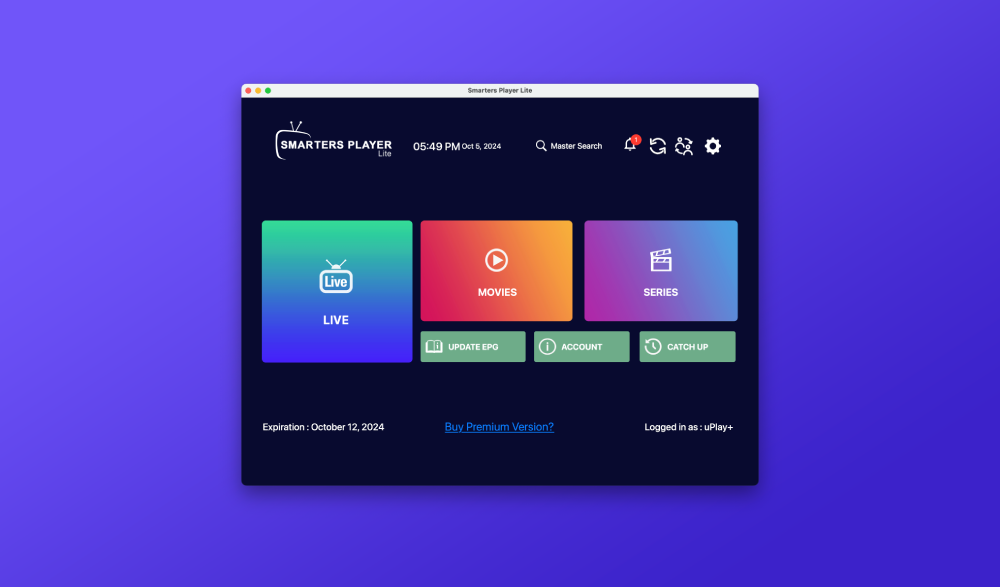
Once you have filled in everything correctly and pressed the "Add Playlist" button, you will see it load. This may take a few minutes. Once it's done, you're ready to start watching what you want!
Now you're done!
Once you've logged in and the playlist has finished loading, you can start watching your favorite football match, hockey game, movie or series. On this screen, you can choose whether you want to watch live channels, movies or series.